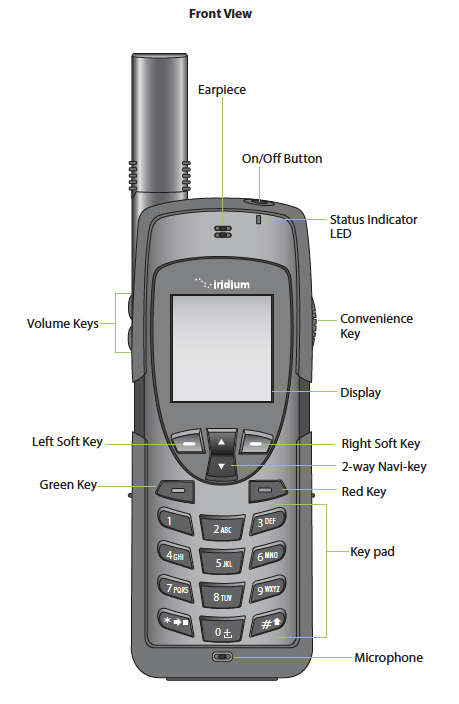
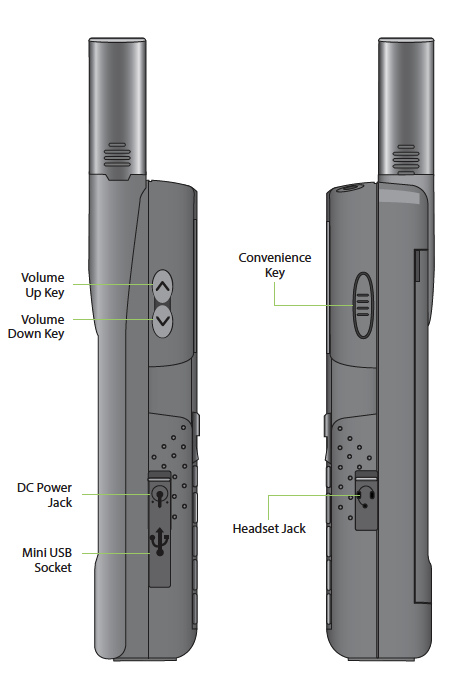
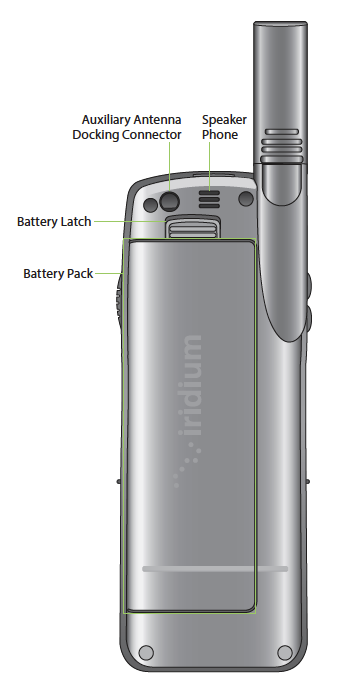
The images on this page show an overview of the buttons and connectors on the Iridium 9555 Satellite Phone.
For more information about this device, please visit Iridium 9555 - User Manual.
Front View
-
Earpiece: Located at the top front, used for listening during calls.
-
Display Screen: Shows signal strength, battery status, and menu options.
-
Left Soft Key: Performs functions indicated on the lower-left of the display.
-
Right Soft Key: Performs functions indicated on the lower-right of the display.
-
2-Way Navi-Key (Navigation Key): Used to navigate through menus and options.
-
Green Key (Send/Answer): Initiates or answers calls.
-
Red Key (End/Power): Ends calls or powers the phone on/off.
-
Keypad: Standard numeric keypad for dialing numbers and entering text.
-
Microphone: Captures your voice during calls.
|
 |
|
Side View
-
Volume Keys: Adjust the volume during a call.
-
DC Power Jack: Connects to the charger for battery charging.
-
Headset Jack: Allows connection of a wired headset for hands-free operation.
-
Mini USB Port: Used for data connections and firmware updates.
|
 |
Back View
-
Antenna Connector: Connects to an external antenna.
-
Battery Compartment: Houses the rechargeable battery.
-
Battery Latch: Secures the battery in place.
-
SIM Card Slot: Located beneath the battery; holds the SIM card.
|
 |

Comments
0 comments
Article is closed for comments.